HostFast
  • 0 Shopping Cart
  • Home
  • Store
    • SSL Certificates HostFast
    • HostFast Unlimited Web Hosting
    • Register a New Domain
    • Transfer Domains to Us
  • Announcements
  • Knowledgebase
  • Network Status
  • Affiliates
  • More
  • Account
    • Login
    • Forgot Password?
  1. Portal Home
  2. Knowledgebase
  3. WordPress
  4. How to Access the WordPress Admin Dashboard

  Categories

1. Getting Started
4
2. cPanel
7
3. Email
10
4. FTP - Uploading Your Website
7
5. Domains
5
6. Nameservers and DNS
5
7. Forms
2
8. Billing
2
9. FAQ - Frequently Asked Questions
7
Backup/Restore
4
CloudLinux (cPanel)
10
cPanel - Control Panel
24
Databases
11
DirectAdmin
48
DNS - Nameservers
6
Domain Management
10
Email
17
FTP
9
Installing a Control Panel
6
Mail Filters & SPAM
8
Mobile
11
Others
3
PayPal
7
PHP / MySQL
4
Plesk
47
Security
11
Security Cpanel
0
SiteWorx (Control Panel)
58
Softaculous
69
SolusVM
18
SSL
6
Virtualizor
19
WHM
18
WordPress
17

  Categories

  Support

My Support Tickets
Announcements
Knowledgebase
Downloads
Network Status
Open Ticket

  Tag Cloud

directory listing error Failed to retrieve directory listing FTP error

  100% Risk-Free Purchase

  • Risk Free No Hidden Fees
  • Risk Free 24x7 Live Support
  • Risk Free Instant Activation
  • Risk Free Money Back Guarantee

Money Back Guarantee

  100% Trusted and Secure

HostFast services are trusted by more than 110,000 users WorldWide.

SITE VERIFIED:

SITE VERIFIED:

SITE VERIFIED:

Customer Service Rating by LivePerson

How to Access the WordPress Admin Dashboard Print

  • 0

WordPress is an easy to work with CMS software. To access a WordPress account, please follow these instructions:


1. Open https://example.com/wp-admin in the web browser. Do not forget to replace example.com with your domain name.

2. Enter your WordPress credentials and click on Login.
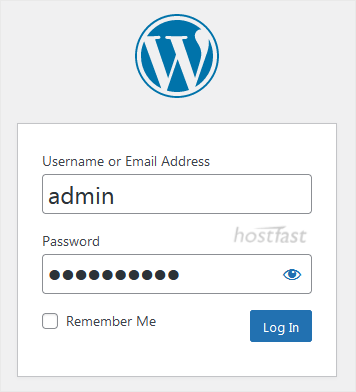
Wordpress-login-dashboard.gif

3. If your login details are correct, you will have successfully logged into the WordPress Dashboard.
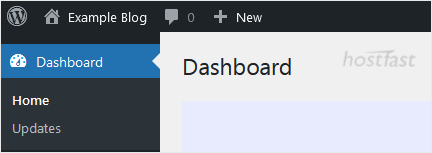
wordpress-admin-dashboard.gif


Was this answer helpful?

Related Articles

How to Remove Sample Comments and Posts From WordPress You get sample comments and posts in a fresh WordPress install. You can easily remove them in the... How to Write and Publish Your First Blog Post in WordPress Writing your first blog post is a fascinating thing. Follow the steps below to do so in... How to Remove a Post in WordPress You can remove the published or draft post in WordPress.1. Log in to the WordPress dashboard. 2.... How to Bulk Delete Posts in WordPress It is possible to delete posts in bulk using WordPress. You can also delete selected posts in... How to Add a New Category in WordPress WordPress categories are handy for you to organize posts. You can create categories and...
« Back

  Support

My Support Tickets
Announcements
Knowledgebase
Downloads
Network Status
Open Ticket

  Tag Cloud

directory listing error Failed to retrieve directory listing FTP error

  100% Risk-Free Purchase

  • Risk Free No Hidden Fees
  • Risk Free 24x7 Live Support
  • Risk Free Instant Activation
  • Risk Free Money Back Guarantee

Money Back Guarantee

  100% Trusted and Secure

HostFast services are trusted by more than 110,000 users WorldWide.

SITE VERIFIED:

SITE VERIFIED:

SITE VERIFIED:

Customer Service Rating by LivePerson

  • Contact Us

HostFast

Copyright © 2026 Support Billing. All Rights Reserved.


Loading...
Loading...
Choose language
العربية
Azerbaijani
Català
中文
Hrvatski
Čeština
Dansk
Nederlands
English
Estonian
Persian
Français
Deutsch
עברית
Magyar
Italiano
Macedonian
Norwegian
Português
Português
Română
Русский
Español
Svenska
Türkçe
Українська

Choose Currency

$ USD
£ GBP
€ EUR
THB
AU$ AUD
HK$ HKD
SG$ SGD
CA$ CAD
Rs INR
CHF CHF
Kr DKK
¥ JPY
Kr NOK
NZ$ NZD
Kr SEK
RM MYR

Generate Password

Please enter a number between 8 and 64 for the password length